
Google Calendar: Your Best Ally to Organize Your Schedule
Tucango Team · 4 min read

Google Calendar is an essential tool for anyone who needs to keep their schedule organized and their tasks under control. Its reminders help you manage each day productively and efficiently.
Time management is a key part of professional life, and scheduling meetings is a fundamental task. However, the complexity of juggling tasks and responsibilities can lead to planning mistakes, such as booking two meetings at the same time or even forgetting an important appointment.
These and many other situations are common in many workers' daily lives and can create confusion around time management. They can also negatively affect productivity, client relationships, and work efficiency, making effective daily planning tools essential.
Google Calendar: a useful tool for managing your meetings
Google Calendar is Google's electronic calendar and scheduling tool, and it is highly effective for managing meetings and events. Its user-friendly interface provides a quick, easy view of your weekly, monthly, and yearly calendar, making it easier to schedule appointments and avoid overlapping meetings.
Another advantage is that Google Calendar is designed for teamwork, enabling more efficient management and more effective communication with your coworkers. Everyone can collaborate in real time and schedule meetings around each other's availability.
Stay available to partners and clients with Google Calendar appointment schedules
When used with a Google Workspace Business Standard, Business Plus, or Enterprise subscription, Google Calendar offers appointment scheduling. This feature lets anyone with an email address book an appointment with you. By allowing others to check your availability and reserve the time that works best for them, this tool can save you time and greatly simplify organizing your schedule.
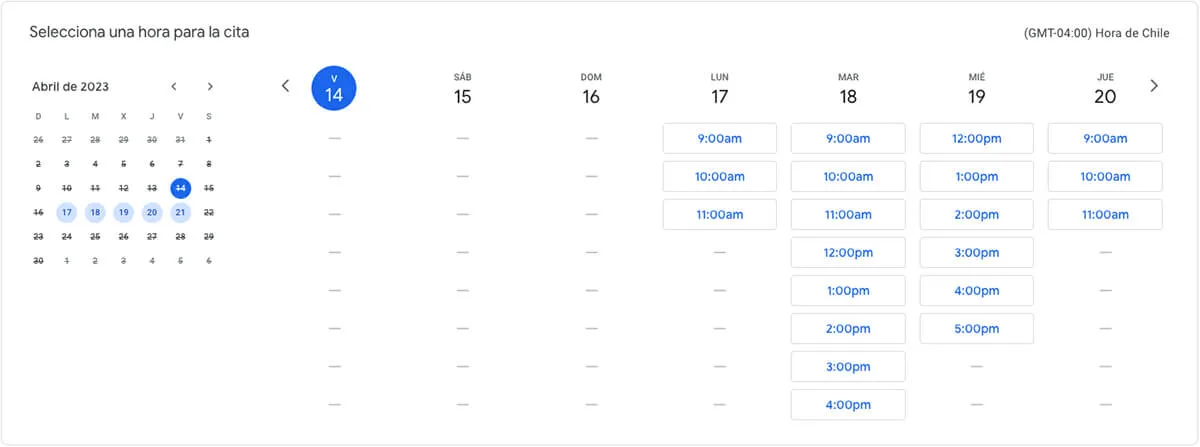
How to get started with Google Calendar appointment schedules
If you would like to start using Google Calendar's appointment scheduling service, here is how to do it. Keep in mind that you must set it up from a computer. Follow these steps!
- Open Google Calendar.
- Click the “+ Create” button in the upper-left corner of the screen and select “Appointment schedule.”
- A window will open where you can set up your appointment schedule. First, choose a title that everyone with access to your booking page can see.
- Next, set the duration of your meetings. The available interval ranges from 15 minutes to 2 hours, but you can also set a custom duration.
- Now set your “General availability,” which can repeat weekly or not, depending on your preference.
- The next section is the “Scheduling window.” This determines how far in advance appointments can be booked. Being prepared matters! Set a minimum and maximum lead time. We recommend being notified at least four hours before the meeting so you have time to prepare.
- Under “Adjusted availability,” you can indicate when you are available on specific dates.
- Pay special attention to “Booked appointment settings,” where you can set the buffer time between appointments. We recommend leaving at least 15 minutes between appointments and deciding how many appointments you want to accept per day.
- Once your schedule is set up, click “Next.” Here you can add a photo, a location for in-person meetings, a description, the information requested when booking, and the timing of reminders before scheduled appointments.
- You're all set! You can now access your booking page and share it with clients and partners. Booked appointments will appear in your personal calendar.
Keep in mind that although Google Calendar is a useful appointment booking platform, it does not have every feature needed to suit every type of business. For example, if your appointments have a specific fee, clients cannot pay directly through it.
Even so, it is an efficient, beneficial tool for independent professionals and businesses of different sizes, helping you improve process efficiency, optimize your time, and adapt to your needs.